Teamviewer Portable 5.0.9104 繁體中文化版

Teamviewer Portable是簡單又能穿越防火牆的遠端遙控軟體

Teamviewer,這是個很有意思的軟體,「A」說他的電腦有問題,要請「B」幫他看一下
此時「B」就可以請「A」下載這個軟體
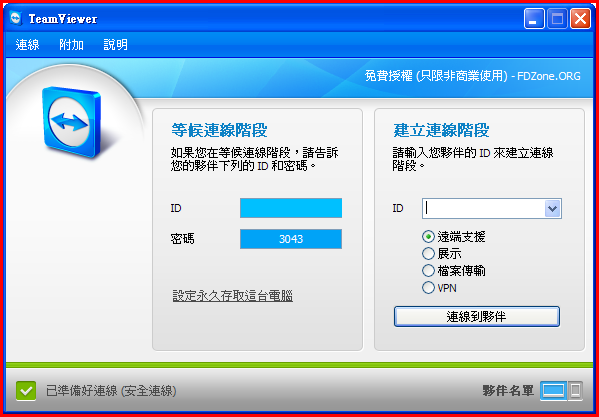
開啟後「A」可以看他畫面出現「ID=87654321、Password=5678」,於是「B」就請「A」把這組帳號密碼給他
然後,「B」也開啟這個軟體,在「Create Session」下方的欄位輸入「87654321」
再按下「Connect to partner」按鈕,跳出密碼輸入對話框,「B」輸入「5678」,很神奇的!
「B」連上「A」的電腦了,還可以互相傳送檔案,完全不需要請「A」這個電腦白痴去查自己的IP(有時搞了老半天還問你什麼是IP?)
後來,「A」又不小心把這個軟體給關掉了,「B」請他再執行一下,結果,一樣「ID=87654321」,而「Password」則變成「3456」了
「A」再告訴「B」這次的密碼,「B」又可以連上「A」的桌面了,真是方便!
這個軟體有別於遠端桌面跟UltraVNC,不需要安裝也不需要知道IP,不過要知道對方的ID,而每台電腦都會有一組專有的ID
經測試確實可以穿透防火牆
,此軟體支援Windows 98/ME/2000/XP/Vista。
Remote Control of PCs over the Internet
Instantly take control over a computer anywhere on the Internet, even through firewalls.
No installation required, just use it fast and secure.
# Screen Sharing
TeamViewer can also be used to present your desktop to a partner on the Internet. Show and share your software, PowerPoint presentations etc.
# File Transfer, Chat and more
Share your files, switch the direction during a teamwork session, and a lot more is included in TeamViewer
# Simple to use, fast and secure
TeamViewer is one of the best known solutions on the market - and at the same time offers best value for your money. Non-commercial use is even completely free!
Teamviewer Portable 5.0.9104 繁體中文化版下載網址:
 
  http://por.tw/Downloads/Teamviewer-Portable-5.0.9104.rar

小陳 發表在 痞客邦 留言(0) 人氣()


【文章標題】: 壓縮與解壓縮軟體-Haozip 2.6
【文章作者】: 軟體中文化密訓基地-總教頭
【作者信箱】: steven8ster@gmail.com
【作者首頁】: http://por.tw/f2blog

小陳 發表在 痞客邦 留言(0) 人氣()


【文章標題】: 文字編輯-EmEditor Professional v10.0.0繁體中文化(語系)
【文章作者】: 軟體中文化密訓基地-總教頭
【作者信箱】: steven8ster@gmail.com
【作者首頁】: http://por.tw/f2blog
【軟體中文化課程】: http://por.tw/f2blog/2009-tchinese/index.html
【內容分類】: 文字編輯-EmEditor Professional v10.0.0
【附件大小】: 1.19MB
【基地主機】: http://visdacom.com/f2blog
【解壓密碼】: 軟體中文化教學密訓基地
【版權聲明】: 【原創】軟體中文化密訓基地,轉載必須保留完整標頭。刪除者依法追究!
--------------------------------------------------------------------------------
【文章內容】
  文字編輯-EmEditor Professional v10.0.0繁體中文化(語系)
   
  EmEditor Professional從之前7版開始,有時更新版時【序號】還可以沿用!
  到8版時好像也是:對盜版還不是很防範(當時知名度還不是很高)
  到了9版就有了重大改革,似乎開始在注意一組序號被大量使用的問題
  如今10版出來了(網路沒有序號),國外破解專家乾脆把它了(不註冊也不會跳出註冊畫面)
  這些人也真是的,這樣搞人家怎麼【混】啊!如果使用不錯建議購買正版(除非你沒錢)
  官方中文化語系總是:慢辦拍!(出新版,語系用舊版會出現版本不合的警告!)
  來!總教頭再次把最新版給繁體中文化(至於註冊→不註冊的問題就不要問我啦!)
 
  我最喜歡使用EmEditor Professional的原因是:『他開啟一般文字檔時,只要是網址他會自動產生超連結!』。
  EmEditor Professional v10.0.0 是一款功能強大的文字編輯器!
  它啟動速度快,可以完全代替Windows自帶的記事本。
  足以勝任日常的文字編輯工作,而且良好地支援Unicode和中文字元
  還支援20多種寫程式語言的語法突出顯示。
  此專業版,增強了程式的編輯功能
  使其更適合寫程式人員對個別程式代碼進行編輯修改。
 
  繁體中文化方法:
  請自己先自備英文原版程式(安裝或綠色版英文或簡體都可以!)
  將本目錄下mui與PlugIns目錄複製到程式目錄下覆蓋即可!


   上菜啦!各位看倌請慢用!


小陳 發表在 痞客邦 留言(0) 人氣()


【文章標題】: 自訂滑鼠按鍵 X-Mouse Button Control  1.51 繁體中文化版
【文章作者】: 軟體中文化密訓基地-總教頭
【作者信箱】: steven8ster@gmail.com
【作者首頁】: http://por.tw/f2blog
【軟體中文化課程】: http://por.tw/f2blog/new-E_learning/index.php
【內容分類】: 自訂滑鼠按鍵 X-Mouse Button Control  1.51
【附件大小】: 3.09MB
【基地主機】: http://visdacom.com/f2blog
【解壓密碼】: 軟體中文化教學密訓基地
【版權聲明】: 【原創】軟體中文化密訓基地,轉載必須保留完整標頭。刪除者依法追究!
--------------------------------------------------------------------------------
【文章內容】
  自訂滑鼠按鍵 X-Mouse Button Control  1.51 繁體中文化版
 
 非常實用的滑鼠按鍵自訂軟體,可以修改滑鼠每個按鍵和滾輪所執行的功能,可以針對不同程式配置不同按鍵功能。
  雖然現在大多數滑鼠的驅動都自帶按鍵設定,但對於失去驅動支援的老滑鼠和標準3鍵滑鼠,這個工具還是很實用的。

 
  中文化說明:中文化前先離開運行中的 X-Mouse Button Control,否則必須重啟才能中文化完成。

 
  上菜啦!各位看倌請慢用!

 
--------------------------------------------------------------------------------
【補充說明】
  Added "Double Click Drag" action.
  Fixed bug causing buttons to stop responding in Windows Vista/7 on a standard user
  account with UAC enabled. Note. Under some circumstances the defual button action may
  be applied as well as the remapped action - only during switch between UAC to non UAC window.
  Fixed errors in service launcher that cased XMBC to be called more than once, which had the
  side effect of forcing the icon to be shown, even if "Show icon by default" was not checked.
  Fixed simulated keystrokes which were not working correctly in some circumstances, for
  example, {LWIN}{SHIFT}{RIGHT} and is some applications (VMWare, maybe some games).    
  Fixed hardcoded commands that sent keys (like Copy (CTRL+C), Paste (CTRL+V) etc.) as in 1.50.5
  Write more error information to the windows even log when the service encounters an error.

小陳 發表在 痞客邦 留言(0) 人氣()


【文章標題】: 視訊、音訊、字幕等封裝合併成mkv格式-Mkvtoolnix 4.1.1 多國語系繁體版
【文章作者】: 軟體中文化密訓基地-總教頭
【作者信箱】: steven8ster@gmail.com
【作者首頁】:

小陳 發表在 痞客邦 留言(0) 人氣()

attachments/201009/8984073170.png
【文章標題】:(PHP程式設計) EclipsePHP Studio 1.2.2 ( EPP) 繁體中文版
【文章作者】: PHP-MySQL-程式設計教學密訓基地-總教頭
【作者信箱】: ster168ster@gmail.com
【作者首頁】: http://por.tw/php
【最新教學課程】: http://por.tw/php/new-E_learning/index.php

小陳 發表在 痞客邦 留言(0) 人氣()


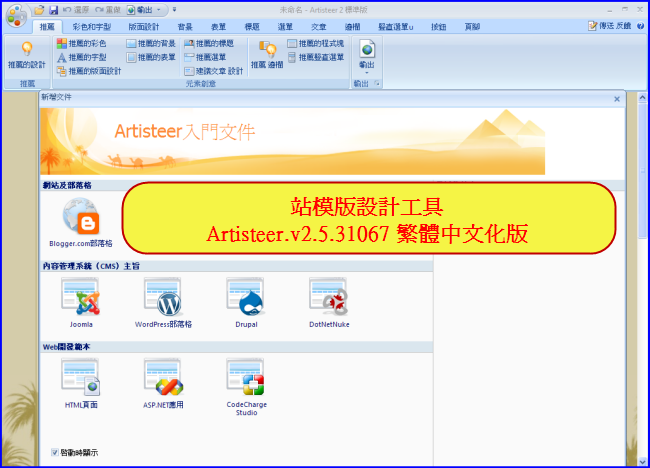
【文章標題】: 站模版設計工具(主題布景產生器)-Artisteer.v2.5.31067 繁體中文化版
【文章作者】: 軟體中文化密訓基地-總教頭
【作者信箱】: steven8ster@gmail.com
【作者首頁】: http://por.tw/f2blog
【軟體中文化課程】: h

小陳 發表在 痞客邦 留言(0) 人氣()


【文章標題】: 文字編輯器-Notepad++ 5.8 免安裝中文版
【文章作者】: 軟體中文化密訓基地-總教頭
【作者信箱】: steven8ster@gmail.com
【作者首頁】: http://por.tw/f2blog
【軟體中文化課程】: http://por.tw/f2blog/2009-tchinese/index.html
【內容分類】: 文字編輯器-Notepad++ 5.8
【附件大小】: 5.29MB
【基地主機】: http://visdacom.com/f2blog
【解壓密碼】: 軟體中文化教學密訓基地
【版權聲明】: 【原創】軟體中文化密訓基地,轉載必須保留完整標頭。刪除者依法追究!
--------------------------------------------------------------------------------
【文章內容】
  文字編輯器-Notepad++ 5.8 免安裝中文版
 
  文字編輯器-Notepad++是在微軟視窗環境之下的一個免費的代碼編輯器。
  為了產生小巧且有效率的代碼編輯器,這個在GPL許可證下的自由軟體開發專案
  採用 win32 api 和 STL 以 C++ 程式語言撰寫成

  並且選用功能強大的編輯模組 Scintilla。
  多虧它的輕巧與執行效率,Notepad++ 可完美地取代微軟視窗的記事本。

 
  [改版訊息]
 
  ※注意:解壓縮後會有兩個資料夾分別為「ansi」與「unicode」編碼版本,若你不懂兩者的差異,請統一使用「unicode」版本!
 
  上菜啦!各位看倌請慢用!

 
--------------------------------------------------------------------------------
【補充說明】
  文字編輯器-Notepad++ 5.8 免安裝中文版
  Notepad++, a source code editor and MS Windows Notepad replacement, has the mission to offer a greener
  environment.
  By optimizing its routines, it results in reducing CPU power consumption then reducing the world carbon
  dioxide emissions.
 
  Notepad++ is a free (as in "free speech" and also as in "free beer") source code editor and Notepad
  replacement that supports several languages. Running in the MS Windows environment, its use is governed by
  GPL License.
 
  Based on the powerful editing component Scintilla, Notepad++ is written in C++ and uses pure Win32 API and
  STL which ensures a higher execution speed and smaller program size. By optimizing as many routines as
  possible without losing user friendliness, Notepad++ is trying to reduce the world carbon dioxide
  emissions. When using less CPU power, the PC can throttle down and reduce power consumption, resulting in a
  greener environment.
 
  This project is mature. However, there may be still some bugs and missing features that are being worked
  on. If you have any questions or suggestions about this project, please post them in the forums. Also, if
  you wish to make a feature request, you can post it there as well. But there's no guarantee that I'll
  implement your request.
 
  You're encouraged to translate Notepad++ into your native tongue if there's not already a translation
  present in the Binary Translations page. And if you want, help translating Notepad++ official site into
  your native tongue would be greatly appreciated.
 
  文字編輯器-Notepad++ 5.8 免安裝中文版下載之檔案位址:
 
  http://por.tw/Downloads/Notepad++_5.8.rar
 
--------------------------------------------------------------------------------
你還在自己摸索如何將英文、日文或簡體中文軟體如何繁體中文化嗎?有【技術顧問服務】可諮詢嗎?
往往一個問題無法解決你可能要發很多時間處理(或許永遠找出答案)那就是軟體中文化痛苦的開始!
購買【軟體中文化】函授課程錄影DVD教學課程,你就可獲得【軟體中文化】技術的【顧問諮詢服務】!

小陳 發表在 痞客邦 留言(0) 人氣()


燒錄軟體-Ashampoo Burning Studio Elements-10.0.9 多國語系(繁體)版
燒錄軟體百百種!最普及的Nero雖然功能強大,卻夾帶許多不常用的功能,而且檔案卻高達300多MB,光下載就要花費不少時間,最重要的是還要付費。
雖然Nero前陣子才釋出免費版,不過功能實在太陽春,就連基本的需求都無法滿足。
如果只要單純的燒錄功能,網路上有許多好用免費軟體,例如ImgBurn 與CD Burner XP等。
今天我們要再介紹一款多功能免費燒錄軟體燒錄軟體-Ashampoo Burning Studio Elements-10.0.9 多國語系(繁體)版。

小陳 發表在 痞客邦 留言(0) 人氣()


禁止程式隨開機而啟動-WhatInStartup 1.25 免安裝中文版
禁止程式隨開機而啟動–WhatInStartup,有許多程式會隨著開機而自己執行(如:MSN),利用此工具可以修改登錄檔的「Startup」項目,程式開啟後按鍵按一下要設定的項目,再按「停用」就可以讓它不隨電腦開機而啟動,可以停用、啟用、刪除登錄檔項目。
此實用工具會顯示列出所有的應用程式,Windows啟動時自動加載了。
對於每個應用程式,顯示以下訊息:啟動類型(註冊 /啟動資料夾),指令行字串,產品名稱,檔案版本,公司名稱,位置在註冊表或檔案系統,並更多。
它可以讓你輕鬆地禁用或刪除不必要的程式運行在Windows啟動。
你可以使用它在您目前正在運行的案例的Windows,以及你可以用它在外部案例的Windows在另一個磁碟機。
WhatInStartup還支援一個特殊的「永久禁用」功能 - 如果一個程式,您以前禁用再加入自己到啟動清單中的Windows,WhatInStartup會自動檢驗變更並禁用它。

小陳 發表在 痞客邦 留言(0) 人氣()


新酷音輸入法-0.3.4.8 自由軟體
(New) Chewing / 新酷音計畫匯集許多開發資源,建立一系列符合自由軟體 (Free / Open Source Software)。
規範的智慧型注音輸入法相關軟體建設,也廣泛為繁體/正體中文使用族群所採用。

小陳 發表在 痞客邦 留言(0) 人氣()


【文章標題】: 強制刪除檔案-Unlocker 1.9.0-繁體中文版
【文章作者】: 軟體中文化密訓基地-總教頭
【作者信箱】: steven8ster@gmail.com
【作者首頁】: http://por.tw/f2blog
【軟體中文化課程】: http://por.tw/f2blog/2009-tchinese/index.html
【內容分類】: 強制刪除檔案-Unlocker
【附件大小】: 0.98MB
【基地主機】: http://visdacom.com/f2blog
【解壓密碼】: 軟體中文化教學密訓基地
【版權聲明】: 【原創】軟體中文化密訓基地,轉載必須保留完整標頭。刪除者依法追究!
--------------------------------------------------------------------------------
【文章內容】
  強制刪除檔案-Unlocker 1.9.0-繁體中文版
 
  各位網友有沒有這樣的經驗,要刪除檔案時:無法刪除?
  那是為什麼?無法刪除檔案有時是:
  有時是因為被檔案總管或其他應用程式給鎖定了,所以無法順利刪除!

  更糟的情況是:病毒及木馬本身有防止刪除的特性,所以當然無法直接刪除
  那該怎麼辦呢?來!總教頭推薦你使用:強制刪除檔案-Unlocker
  Unlocker可以強制刪除無法刪除的檔案!
  這個工具可以幫助你解除鎖定,甚至手動刪除病毒及木馬
  有些情況無法立即刪除時,會自動在重新開機後刪除,也可以應用於暴力移除某些無法移除的程式。

 
   上菜啦!各位看倌請慢用!

小陳 發表在 痞客邦 留言(0) 人氣()

Blog Stats
⚠️

成人內容提醒

本部落格內容僅限年滿十八歲者瀏覽。
若您未滿十八歲,請立即離開。

已滿十八歲者,亦請勿將內容提供給未成年人士。